Training
You can access the training functions in two ways:
1. By clicking on the dog's name in the device list.
2. By clicking on the dog icon on the map.
info
If the collar has training functions, the training window will appear. For other devices, clicking will show the device detail.
Training Description
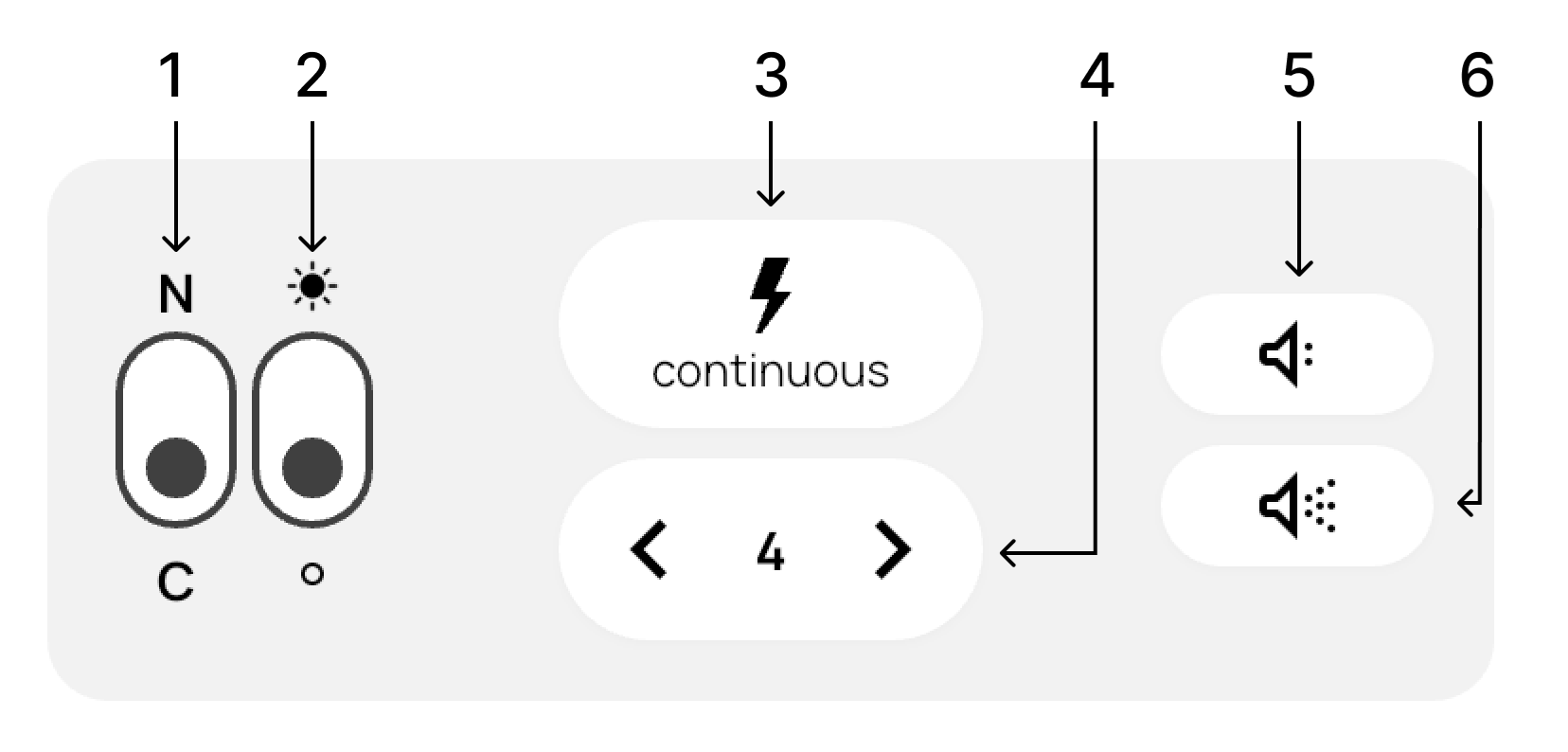
1. Mode selection: Nick (N) – short pulse / Continuous (C) – long pulse
2. Collar light control (if available) – turn on or turn off
3. Send the selected pulse to the collar (if available)
4. Set the pulse strength
5. Send a training tone
6. Send a location tone
Available functions by collar type
| Device type | Training tone | Location tone | Pulse | Light | Vibration |
|---|---|---|---|---|---|
| X40 | ✓ Pitch adjustment | ✓ Pitch adjustment | — | ✓ | ✓ |
| X40B | ✓ Pitch and volume adjustment | ✓ Pitch and volume adjustment | — | ✓ | ✓ |
| X40T | ✓ Pitch adjustment | ✓ Pitch adjustment | ✓ | ✓ | ✓ |
| X40TB | ✓ Pitch and volume adjustment | ✓ Pitch and volume adjustment | ✓ | ✓ | ✓ |
| X30 | ✓ | ✓ | — | — | — |
| X30B | ✓ Volume adjustment | ✓ Volume adjustment | — | — | — |
| X30T | ✓ | ✓ | ✓ | ✓ | — |
| X30TB | ✓ Volume adjustment | ✓ Volume adjustment | ✓ | ✓ | — |
✓ Function available
— Function unavailable
Training settings
Tone and light settings depend on the collar type – see the table above for an overview.
- Tone – depending on the collar type, you can adjust the pitch, volume, or both.
- Light – choose a color and one of three modes: slow flashing, fast flashing, or steady light.