Device Settings
On this screen you can edit parameters of a specific paired device.
Name
Change the device name.
Visible
Here you determine whether the collar should be displayed on the main screens. If you have a paired collar that you left at home, you can hide it. The device remains paired but won't interfere on overview screens.
Update Interval
Set how often the collar should send data to the controller (in seconds).
- Shorter interval = more accurate information, but higher battery consumption
- Longer interval = longer battery life, but less frequent updates
Notification Settings
Here notifications for collar functions are set:
- Motion Detection – notifications for changes in dog activity
- Wild Boar Hunting – notifications for found wild boars
- Geo-fence – notifications when crossing virtual fences
- Circular Fence – notifications for circular virtual fences
- Barking Detection – control and reaction to barking
- RF Signal Loss – notifications for connection outages
- Geofences in the collar – notifications for geofences stored in the collar
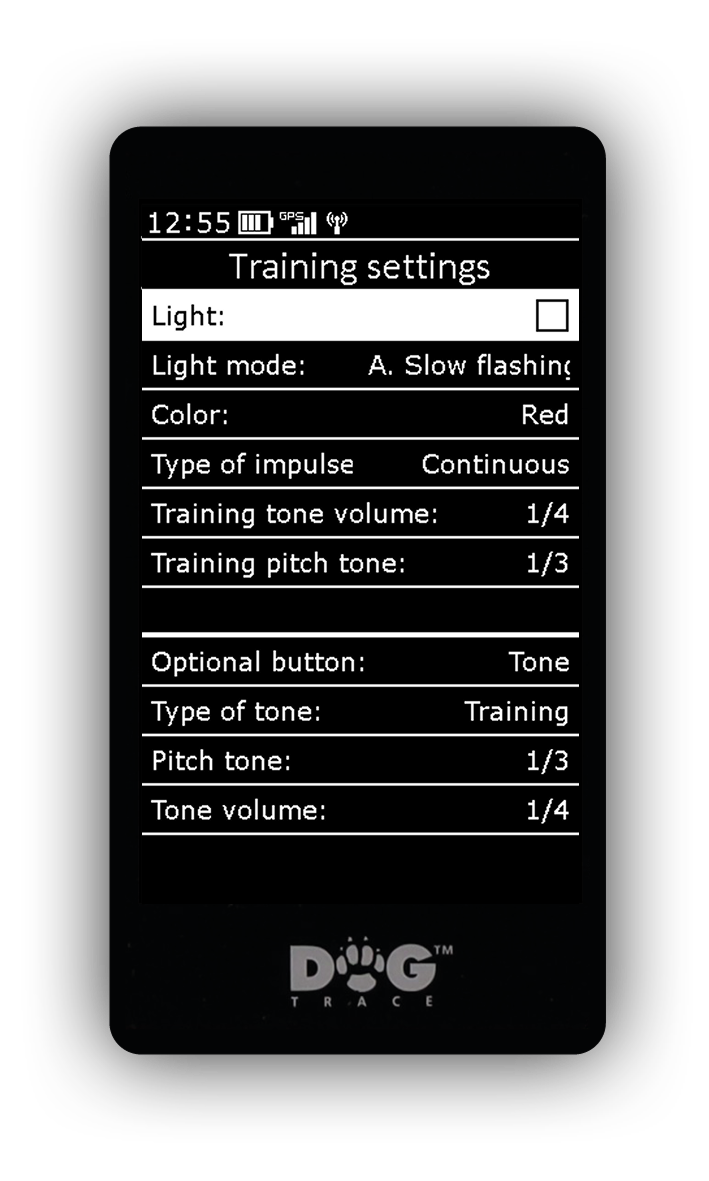
Training Settings
On this screen the training buttons work – during setup you can test everything immediately.
Light on collar:
- Light – on/off
- Light Mode: (X40 only)
- A: Slow blinking
- B: Fast blinking
- C: Steady light
- Color (X40 only) – red, orange, yellow, green, cyan, blue, purple, pink, and white
The following settings apply to fixed training buttons (first two from left):
- Impulse Type – choose desired training impulse type Long / Short
- Training Tone Pitch:
- 1/3 – low tone
- 2/3 – higher tone
- 3/3 – high tone
- Training Tone Volume – sound intensity setting in 4 levels from quiet to loud
The following setting is for the optional button (third from right):
- Optional Button: possibility to assign a specific function to the button for the selected collar:
- Light
- Vibration (X40 only)
- Booster – enhanced impulse. After confirming the selection, you can adjust its power in the range 0–20.
- Tone – sound signals. After selecting this function you can further set:
- Tone Type – training or localization
- Localization Tone Pitch – levels 1–3
- Localization Tone Volume – levels 1–4
- Rec (X40 only) – playback of sound from the collar
Delete
This option causes collar unpairing. The collar will be removed from the list of paired devices and its position will be freed.