Training
This function allows performing corrections of unwanted behavior at distances up to 20 km. The basic DOG GPS X30/X30B set allows the use of tone (acoustic command). The DOG GPS X30T/X30TB set with training module is extended with stimulation impulse and light for dog indication in darkness using powerful LEDs.
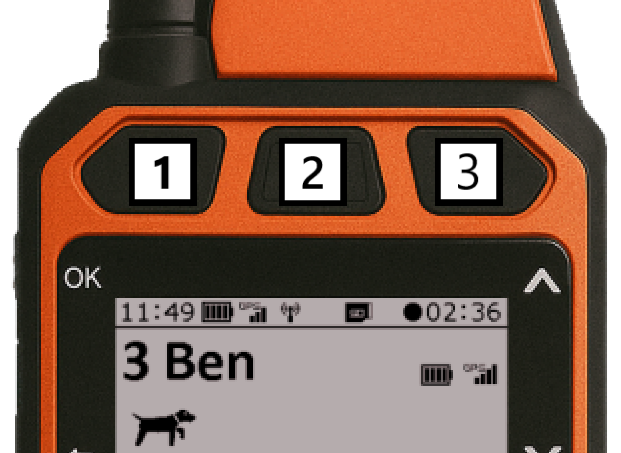
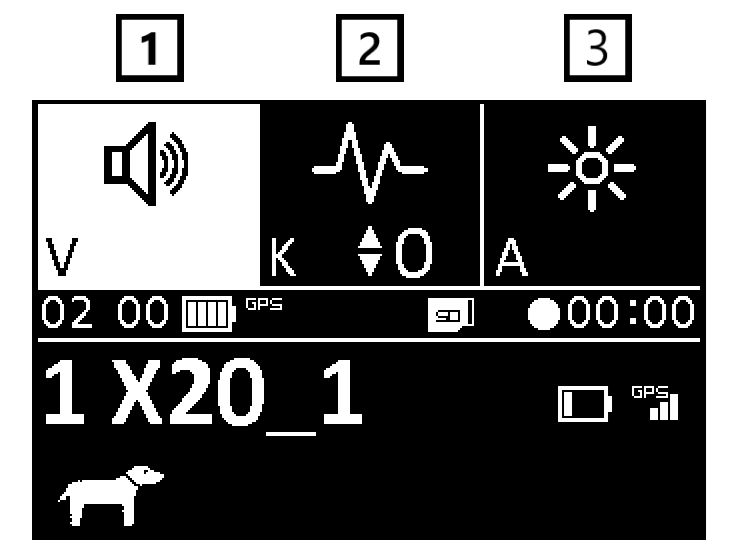
 The first button always has a permanently assigned function – it activates training tone for all collars.
 The second button is exclusively for stimulation impulse.
 Only the third button is optional. You can choose one of the following functions: Booster, Tone, Light, REC, or Vibration.
Training buttons only work on main screens.
The training bar displays the configured training commands. After a training button is pressed, an animation of a rotating circle appears in the top-right corner of the button, indicating that the handheld device is waiting for confirmation from the collar.
The result then appears:
- ✓ The collar received the command and confirmed its execution.
- ✕ No confirmation was received from the collar.
This makes it easy to check whether the training command reached the collar.
The cross does not always mean that the command failed to reach the collar. The collar may receive and execute the command, but the handheld device may fail to receive the return confirmation—for example, if the dog moves beyond reliable radio range at that moment.
 Tone (acoustic signal)
All sets from the X30 and X40 series allow two types of tone:
- Training - serves as a sound command for the dog. This command can precede the stimulation impulse and is a very effective warning. It replaces a whistle, whose volume the dog perceives the same even when very distant.
- Localization - acoustic signal used to find the dog in darkness or dense vegetation. This signal is audible up to 30 m distance (X30/X30T transmitters), or up to 300 m distance (X30B/X30TB transmitters).
| Sound | Tone pitch 1 | Tone pitch 2 | Tone pitch 3 |
|---|---|---|---|
| Training | |||
| Location |
For more information about the settings, see Training Settings.
 Stimulation Impulse
(ONLY GPS X30T/X30TB) This function allows activating collar alerts in the form of safe stimulation impulses transmitted through two contact points. The essence of stimulation impulses is not to harm the dog. The impulse is very unpleasant for the dog, so they quickly create a connection between the verbal command, acoustic signal, and the unpleasant feeling on their neck.
You set the stimulation impulse strength using arrows  /
/
 when the training bar is displayed.
Send an impulse from the controller by pressing the middle training button, but only if the training bar is already displayed.
If it's not displayed, the first press only activates the bar and the impulse is not sent yet. Only with the next button press is the impulse sent.
Example:
First press the left button for tone (the tone field highlights), then the middle button for impulse – in this case the impulse is sent immediately on first press.
For more information about the settings, see Training Settings.
 Light
Light
For locating the dog in darkness, the light function can be used.
X40 collars only
The light can be set to three modes:
- slow flashing,
- fast flashing,
- steady light.
You can also select one of nine preset colors:
- red, orange, yellow, green, cyan, blue, purple, pink, or white.
The different colors make it easier to distinguish individual dogs when using multiple collars at the same time.
For more information about the settings, see Training Settings.
 Booster
The booster function allows choosing higher stimulation impulse intensity than the main stimulation impulse setting. This button is a ready option for solving extreme situations when your dog doesn't react to the standard stimulation impulse level and you need to act quickly with higher stimulation impulse intensity.
For more information about the settings, see Training Settings.
REC (Sound recording)
The REC function lets you record sound around the X40 collar and play it back on the handheld device.
- Press the button assigned to the REC function. The collar records sound for 5 seconds.
- The recording is transferred to the handheld device and plays automatically after approximately 20 seconds.
- After playback, you have 10 seconds to play the same recording again. Simply press the REC button again.
- Each replay restarts the ten-second timer. You can replay the recording again while the timer is counting down.
- When the timer expires, replay mode ends. The next time you press the REC button, the collar makes a new five-second recording.
Vibration
X40 collars also support vibration, which can be used as another way to communicate with the dog during training.
How to set training buttons?
Training button settings for individual dogs are configured in Training Settings.
You can change the optional button directly from the training bar:
1. Display the training bar:
– by briefly pressing any training button (this will trigger a training command).
– Exception: the middle button with impulse on first press only displays the bar without sending an impulse (if the bar wasn't displayed yet).
2. Once the bar is displayed, press the OK button.
3. A menu of functions for the optional button will appear.
4. Use arrows to select the desired function and confirm with the OK button.